
Monitoring of Informational Technology systems offers a number of advantages: alarms, rapid threat detection, detection of the source of problems,...
Learn how to migrate a legacy document system seamlessly without disrupting business operations by following essential strategies and best practices.
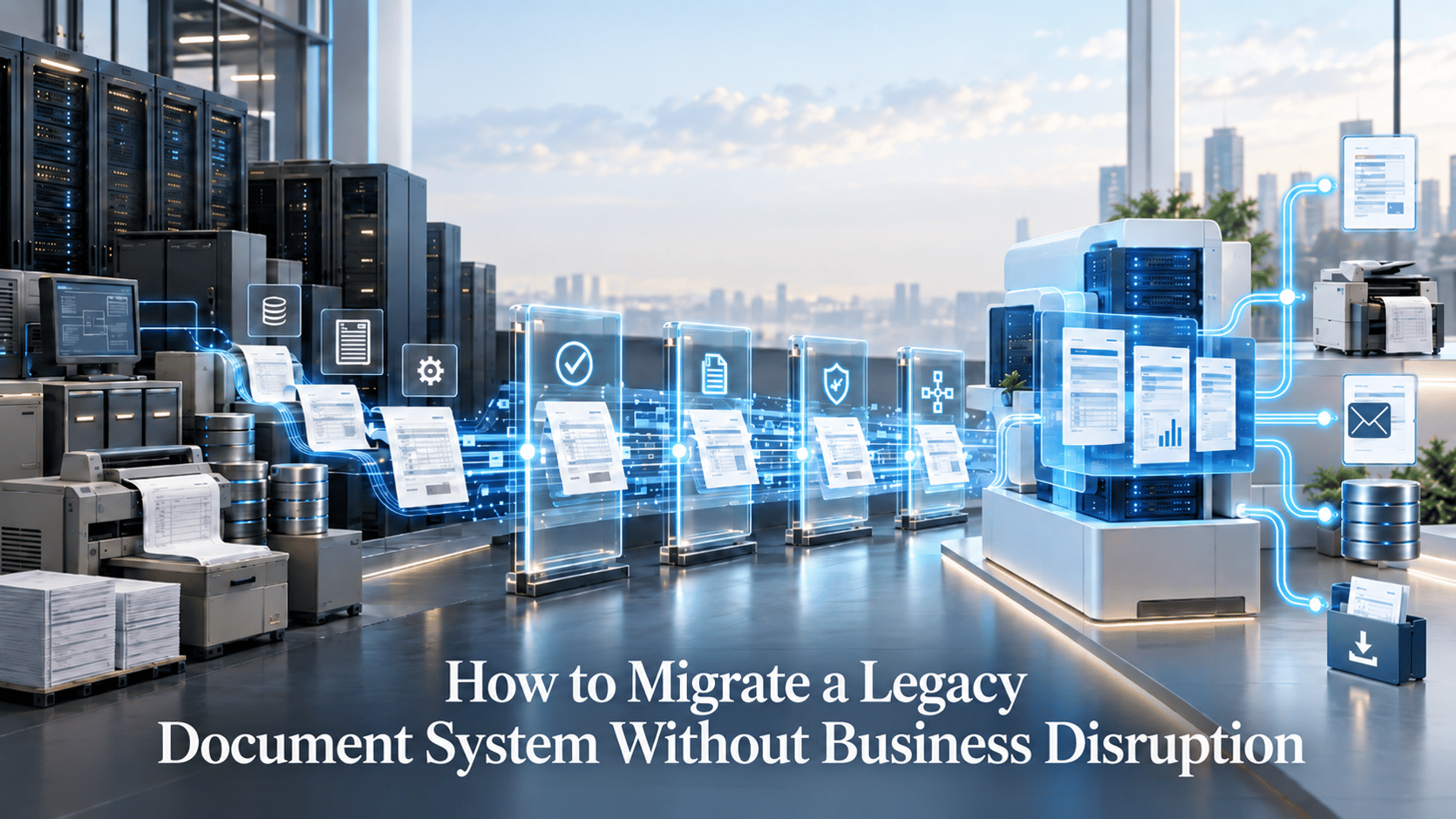
Migrating a legacy document system is not simply a matter of transferring files or rebuilding forms. In a mission-critical environment, document generation may depend on core applications, data feeds, business rules, templates, fonts, print streams, printers, digital channels, and archives.
The modernization pressure is real. In 2024, Kyndryl reported that 44% of mission-critical IT components such as servers, storage, networks, and operating systems were approaching or already at end of life.
At DocPath, we recommend a continuity-first approach: understand the production estate, migrate in controlled waves, validate outputs against approved baselines, keep rollback available, and retire the legacy system only when its dependencies are gone.
Quick Summary
Legacy document system migration is the controlled replacement of a production document-generation or CCM platform while preserving templates, business rules, data inputs, output formats, printers, archives, and calling applications. Use it when an unsupported or inflexible system must be modernized without interrupting customer communications. Start with a complete dependency inventory, then migrate and validate in phases under parallel production. Caveat: output equivalence must be defined by business and compliance requirements, not visual similarity alone.
At DocPath, we define a continuity-first migration around six core principles:
- Inventory the entire production estate.
- Preserve existing interfaces where practical.
- Retire obsolete assets before converting them.
- Build regression tests before cutover.
- Run critical workloads in parallel.
- Decommission only after callers and downstream processes are verified.
For organizations evaluating specific legacy platforms, our legacy document migration options include supported paths for JetForm/Adobe Central, InfoPrint Designer/AFP Utilities, and Control-D.
What Is a Legacy Document System Migration and What Is It Not?
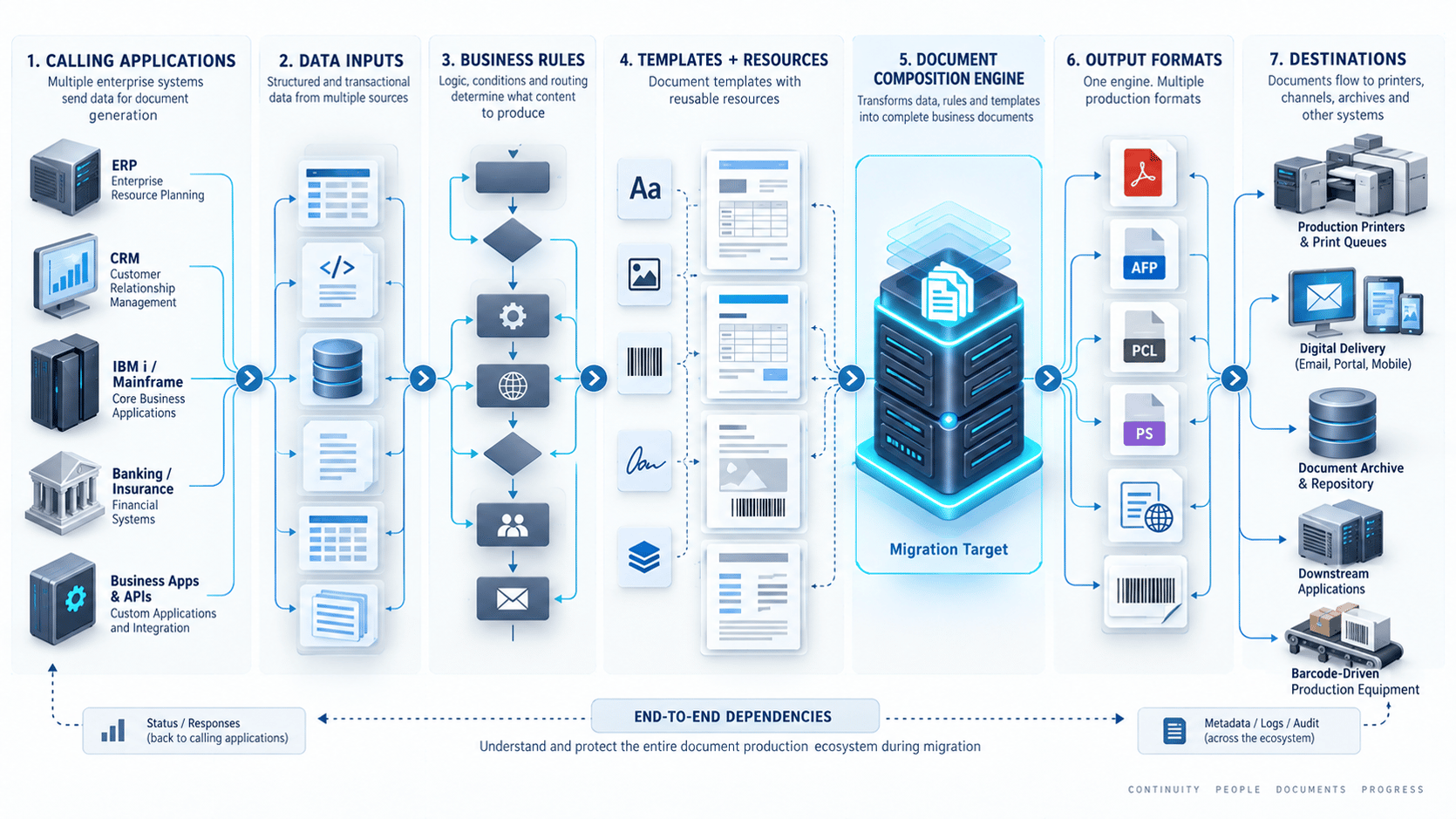
We define a legacy document system migration as the replacement of technology that composes, generates, routes, prints, distributes, or archives business documents while preserving the behavior that surrounding applications depend on. It differs from a repository migration because the documents are generated dynamically from data, rules, templates, resources, and runtime integrations.
The production chain we typically evaluate looks like this:
Calling application → data feed → business rules → template and resources → composition engine → output format → printer or digital channel → archive
That chain defines the real migration scope.
|
Project type |
Primary object being changed |
Main acceptance question |
|
Repository migration |
Existing files and metadata |
Can documents still be found and retrieved? |
|
File-format conversion |
Stored or generated files |
Does the new format preserve required characteristics? |
|
Database migration |
Structured data |
Are records and application behaviors preserved? |
|
Document-generation migration |
Live composition and distribution processes |
Can the business still generate and deliver the correct document? |
From our perspective, this distinction matters because a PDF that looks correct does not prove that an AFP job prints correctly, that archive metadata is preserved, or that the calling application received the response it expected.
We currently document migration paths for JetForm/Adobe Central, InfoPrint Designer/AFP Utilities, and Control-D.
For Latin American organizations, we also account for environments that may contain Spanish and Portuguese variants, country-specific wording, local print centers, and different downstream applications. Those differences should be treated as explicit dependencies rather than folded into a single regional configuration.
What Should You Inventory Before a Migration Starts?
Before converting anything, we recommend inventorying every asset and dependency required to reproduce production behavior. Templates are only one layer; callers, data feeds, rules, fonts, output formats, printers, queues, archives, schedules, and exception processes also belong in scope.
We recommend giving every item a clear disposition: migrate, consolidate, redesign, retain temporarily, or retire.
|
Inventory item |
What to capture |
Why it matters |
Owner |
Migration action |
Required test evidence |
|
Template/document family |
Version, language, rules, shared assets |
Defines conversion scope |
Business + document team |
Migrate/consolidate/retire |
Golden samples |
|
Calling application |
Invocation method, parameters, responses |
Protects upstream processing |
Application owner |
Preserve or remap |
Interface test |
|
Data feed |
Format, encoding, fields, frequency |
Protects variable content |
Data/application owner |
Reuse or transform |
Field comparison |
|
Business rules |
Conditions, calculations, routing |
Protects document meaning |
Business owner |
Reimplement and trace |
Rule tests |
|
Fonts/resources |
Versions, licenses, logos, barcodes |
Protects rendering and printing |
Brand/IT |
Package or replace |
Rendering comparison |
|
Output format |
AFP, PCL, PDF, PostScript, labels |
Protects downstream compatibility |
Operations |
Reproduce or change |
Format validation |
|
Printer/queue |
Device, tray, duplex, finishing |
Protects physical production |
Print operations |
Certify |
Printed samples |
|
Archive |
Repository, index keys, metadata |
Protects retrieval and auditability |
Records/IT |
Integrate separately |
Retrieval test |
We prefer to keep unknown dependencies visible as risks until they are resolved rather than silently converting them into assumptions.
Which templates, rules, fonts, and reusable resources must be captured?
We recommend inventorying both the visible template and the resources that control its behavior. Conditional logic, shared fragments, fonts, graphics, barcodes, overlays, language variants, and approved samples should all be attached to the relevant document family.
Capture at minimum:
- Template ID, version, and status.
- Business and technical owners.
- Country and language variants.
- Conditional text and suppression rules.
- Shared headers, footers, and clauses.
- Logos, graphics, overlays, and signatures.
- Font family, weight, version, and licensing.
- Barcodes and other machine-readable elements.
- Approved production samples.
We also recommend testing font substitutions because they can affect line wrapping, pagination, and print layout. For Spanish and Portuguese output, we include accented characters, diacritics, local currencies, and representative numeric formats in the regression set.
We support automated resource conversion for certain legacy source technologies, although the exact path depends on the source platform and project scope.
Which calling applications and data feeds depend on the legacy engine?
We recommend mapping every application that invokes the legacy engine before the target architecture is finalized. The important question is not only what data is sent, but how the caller invokes generation and what behavior it expects in return.
Record:
- Calling system.
- Invocation method.
- Payload schema or record layout.
- Character encoding.
- Parameters.
- Return or status codes.
- Retry and replay behavior.
- Scheduling dependencies.
- Authentication.
- Monitoring requirements.
We use this information as the basis for an interface contract.
Our enterprise integration capabilities include IBM i, IBM z/OS, ERP, CRM, banking, and insurance environments.
Which outputs, printers, archives, and downstream systems must be inventoried?
From our perspective, a migration is incomplete if the new engine produces a visually correct document but breaks the system that prints, distributes, stores, or retrieves it. Every physical and digital destination should therefore be part of discovery.
We recommend inventorying:
- PDF, AFP, PCL, PostScript, label, and other formats actually in use.
- Printer models and queues.
- Trays, media, duplex behavior, and finishing.
- Barcode-driven inserters or scanners.
- Digital delivery channels.
- Archive repositories and index values.
- Retrieval APIs and monitoring systems.
IBM documents AFP as an architecture that can depend on fonts, form definitions, page segments, overlays, page definitions, and other resources.
If printing is decentralized across Latin America, we recommend certifying the relevant local environments rather than assuming one printer configuration represents the whole region.
Which Migration Approach Best Protects Production Continuity?
For a mission-critical document estate, we generally use phased migration with controlled coexistence as the safest planning baseline unless discovery supports another model. The right approach depends on document criticality, interface dependencies, rollback requirements, and whether both environments can operate temporarily.
In 2025, Kyndryl reported that 80% of 500 surveyed senior IT and business leaders had changed their mainframe modernization strategy during the previous 12 months.
In the same 2025 research, 99% of surveyed organizations were operating in a hybrid environment.
|
Approach |
Best fit |
Production continuity model |
Validation required |
Rollback complexity |
Main caveat |
|
Big-bang |
Small, well-understood estates |
Legacy stops as target starts |
Full pre-cutover certification |
High if dependencies are missed |
Concentrates risk |
|
Phased by document family |
Large, separable estates |
Legacy and target coexist |
Per-family regression |
Moderate |
Requires dual operations |
|
Phased by country/business unit |
Multi-country organizations |
Geographic coexistence |
Local system and compliance tests |
Moderate |
Shared dependencies remain |
|
Progressive routing |
High-criticality environments |
Selected workloads move gradually |
Live reconciliation |
Lower if routing is reversible |
Requires strong routing controls |
We recommend defining entry criteria, exit criteria, and rollback conditions for every migration wave.
For Latin American organizations with different local systems or regulatory requirements, we may recommend country-by-country or business-unit waves to reduce the impact of an issue.
If your current environment contains unknown dependencies, we recommend starting with discovery rather than conversion. Contact us to review the migration scope.
How Do You Migrate a Legacy Document System Without Stopping Production?
At DocPath, we recommend progressing through controlled gates rather than treating migration as a single conversion event. Each phase should produce evidence that the next phase can proceed safely.
Our practical migration roadmap has 12 steps:
- Establish governance and acceptance criteria. We define owners, continuity requirements, equivalence criteria, and go/no-go authority.
- Build the production inventory. We use the inventory framework above to identify templates, callers, data feeds, rules, resources, outputs, printers, and archives.
- Map the dependency graph. We trace each document family from caller through data, rules, rendering, output, distribution, and archive.
- Rationalize the estate. We identify obsolete forms and duplicates before investing in conversion and testing.
- Capture interface contracts. We document how each caller invokes the legacy engine and what responses it expects.
- Capture resources and business rules. We identify fonts, overlays, graphics, barcodes, conditional logic, and routing rules.
- Build the target environments. We separate development, test, preproduction, and production controls according to organizational requirements.
- Create golden test data. We build representative normal, edge, multilingual, multi-page, and exception cases.
- Run layered regression testing. We validate business meaning, layout, output format, printers, archives, accessibility, and operational behavior.
- Run parallel production. We process controlled inputs through both environments and reconcile the results without creating duplicate customer communications.
- Cut over in waves. We move only approved document families, countries, or workloads, with monitoring and rollback still available.
- Stabilize and decommission. We remove the legacy environment only after all remaining callers and downstream processes have been verified.
The detailed controls for testing, parallel production, rollback, and decommissioning appear in the sections below.
Our Fifth Third Bank migration case study describes a migration in which existing applications did not need to be modified.
How Do You Preserve Calling Applications, Data Feeds, and Business Rules?
At DocPath, we aim to minimize unnecessary upstream changes and make existing interface behavior explicit. If the target platform can preserve the legacy interface contract, the composition engine may be replaced without forcing changes into every surrounding application.
This matters when the core system is still fit for purpose. Replacing document generation does not automatically require replacing the ERP, mainframe workload, policy administration system, or IBM i application that calls it.
Our integration architecture includes IBM i and IBM z/OS connectivity.
For certain JetForm/Adobe Central migrations, we also support processing the same input data without requiring the business application to change.
We still validate that capability against the actual source version, custom code, preprocessing, and data flows.
What should a legacy-to-target interface contract contain?
We use an interface contract to define what the caller sends, what the document platform does with it, and what the caller receives back. It turns an undocumented dependency into something we can test.
Include:
- Source application and owner.
- Invocation method.
- Payload format.
- Required and optional fields.
- Encoding.
- File or resource naming rules.
- Parameters.
- Security.
- Return/status codes.
- Retry and replay behavior.
- Scheduling.
- Logging and trace identifiers.
If any of those behaviors change intentionally, we recommend having the application owner approve the difference before cutover.
Where does hidden document business logic usually live?
In our experience, business logic may exist in the template, preprocessing code, host application, scripts, routing tables, data-extraction rules, or printer configuration. Migrating only the visible template can therefore preserve appearance while changing the business result.
We look for logic controlling:
- Calculations.
- Conditional paragraphs.
- Language selection.
- Legal-entity selection.
- Product variants.
- Page suppression.
- Printer routing.
- Archive classification.
- Recipient or channel selection.
A useful discovery question we use is: What causes this document to behave differently?
Each answer should point to the component that implements the behavior and to a regression test that proves it still works.
How Do You Migrate Templates, Fonts, AFP/PCL, and Printer Dependencies?
At DocPath, we treat the characteristics that downstream devices and processes depend on as production requirements, not as cosmetic details. Templates, fonts, AFP/PCL behavior, barcodes, pagination, and printer controls therefore need to be validated independently of whether a PDF looks correct on screen.
IBM describes AFP as an architecture that can use fonts, overlays, page segments, form definitions, and page definitions.
In our 2026 Reliable Parts case study, the migration involved approximately 500 printers across its U.S. and Canadian operations while retaining the upstream AS400 document flow. (https://global.docpath.com/en/blog/how-reliable-parts-replaced-jetform-with-a-cloud-ready-document-solution-on-aws)
How should templates, fonts, and shared resources be migrated?
We convert templates as structured production assets rather than treating legacy output as a screenshot to reproduce. Fonts, reusable fragments, logos, overlays, and barcodes should remain identifiable and testable because substitutions can alter pagination and physical output.
For each template family, we recommend:
- Mapping legacy constructs to target constructs.
- Separating automated conversion from manual remediation.
- Identifying shared resources.
- Recording font files and versions.
- Verifying font licensing and embedding.
- Validating logos, signatures, and overlays.
- Testing barcodes.
- Testing Spanish, Portuguese, and other required language variants.
We may also use migration as an opportunity to reduce unnecessary duplication, but consolidation should not remove legitimate differences such as country-specific clauses or routing logic.
How should AFP, PCL, printer queues, and physical output be validated?
We recommend validating AFP and PCL migration both at the generated-stream level and on representative production devices. Testing should cover the behaviors that actually matter to print operations.
|
Test area |
What to verify |
|
Data stream |
Correct AFP, PCL, or target format |
|
Page geometry |
Size, orientation, margins |
|
Resources |
Fonts, overlays, images |
|
Media |
Correct stock and tray |
|
Duplex |
Required simplex/duplex behavior |
|
Pagination |
Page count and sequence |
|
Barcodes |
Correct data and successful scan |
|
Finishing |
Stapling, inserting, folding |
|
Queue handling |
Destination, retries, failover |
|
Batch behavior |
Large-job stability |
Where downstream equipment includes inserters, sorters, or scanners, we recommend testing those processes too.
How Do You Prove Output Equivalence With Regression Testing?
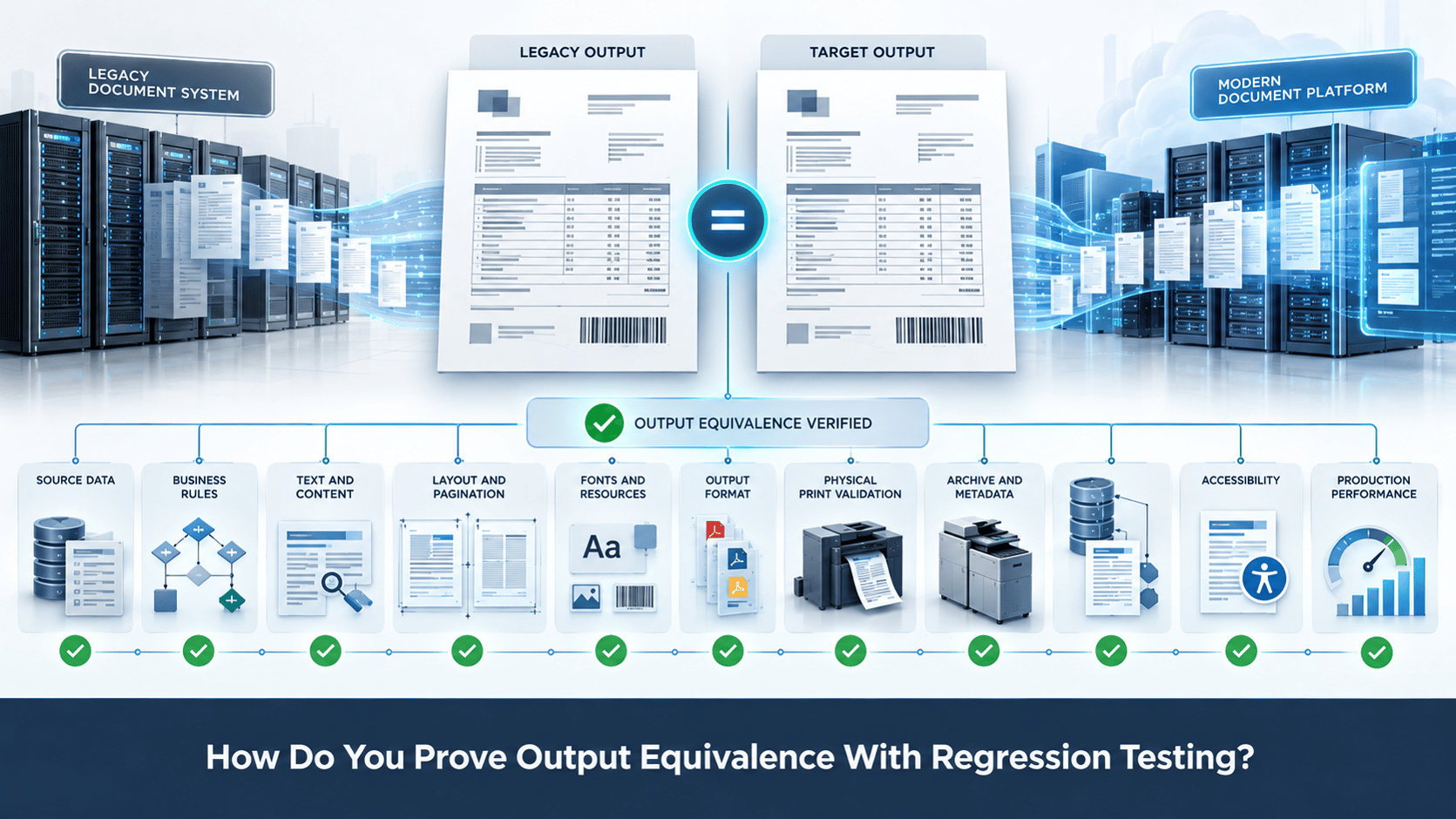
We use regression testing to prove that the target preserves required document meaning and downstream behavior. Visual comparison alone is not enough because a document may look correct while containing wrong values, incorrect conditional content, broken metadata, or incompatible print controls.
We recommend defining equivalence before testing begins. For one document family, exact layout may be required. For another, an approved redesign may be acceptable if business meaning, rules, outputs, and compliance obligations remain correct.
|
Test layer |
What is compared |
Typical evidence |
|
Data |
Source values vs generated values |
Field comparison |
|
Rules |
Conditional outcomes |
Rule test |
|
Text |
Required wording |
Text diff |
|
Layout |
Position and dimensions |
Visual comparison |
|
Pagination |
Page count and breaks |
Page comparison |
|
Resources |
Fonts, logos, overlays |
Resource report |
|
Output format |
AFP/PCL/PDF/etc. |
Technical validation |
|
Printer |
Media, duplex, barcode, finishing |
Printed sample |
|
Archive |
Metadata and retrieval |
Archive test |
|
Accessibility |
Structure and assistive use |
Validator + review |
|
Performance |
Production processing |
Load-test evidence |
We recommend preserving the evidence behind the pass or failure. That makes exceptions traceable and gives business owners something concrete to approve.
What belongs in a golden regression data set?
We build golden data sets to exercise every meaningful branch of document behavior rather than replaying only average transactions. The goal is to include the cases most likely to expose differences.
We recommend including:
- Minimum and maximum values.
- Empty optional fields.
- One and many line items.
- Long names and addresses.
- Spanish and Portuguese content.
- Special characters.
- Country and legal-entity variants.
- Multi-page documents.
- Conditional clauses.
- Exception messages.
- Barcodes.
- High-volume batches.
- Reprints and replay cases.
Every material rule should map to at least one known test case. Otherwise, a successful regression run may simply mean the rule was never exercised.
What should automated output comparison actually check?
We use several comparison layers because no single diff can prove equivalence. Automated checks should focus on the areas where machines can consistently identify meaningful differences, then route exceptions for human review.
Useful checks include:
- Field and value comparison.
- Extracted text.
- Calculations.
- Conditional content.
- Page count.
- Visual or coordinate differences.
- Font and resource use.
- Barcodes.
- AFP/PCL validity.
- Archive metadata.
- Accessibility validation.
- Batch document counts.
Automation identifies the difference. We then work with business and technical owners to determine whether it is a defect, an approved modernization change, or an acceptable rendering variation.
How Should Parallel Production, Cutover, and Rollback Work?
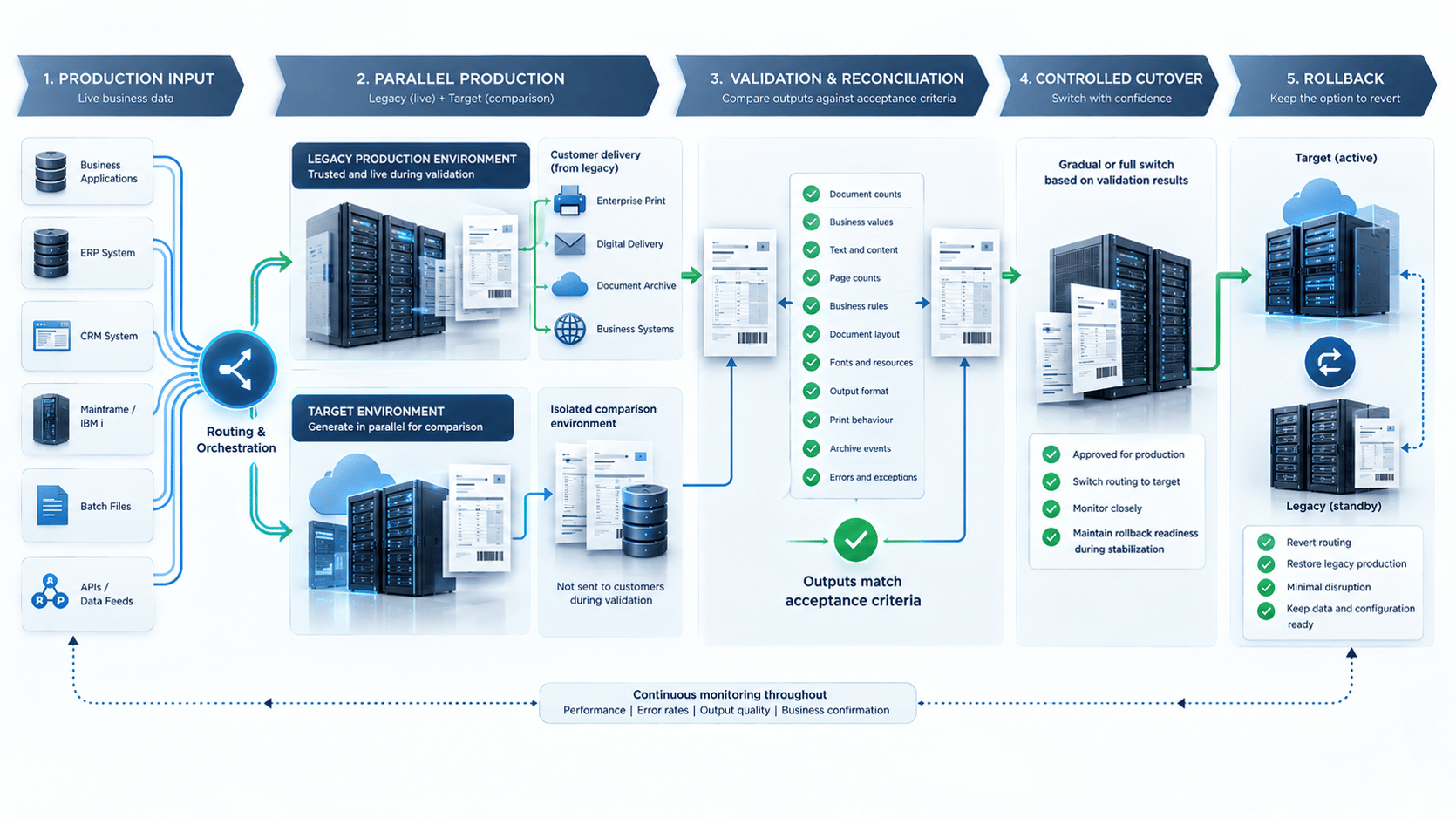
We use parallel production as the bridge between controlled testing and full cutover. Critical workloads should be generated through both systems, reconciled, and moved only when predefined acceptance criteria are satisfied and routing can still be reversed.
In Uptime Institute's 2025 outage analysis, 54% of respondents said their most recent significant, serious, or severe outage cost more than $100,000.
That is not a document-migration benchmark, but it illustrates why we favor explicit production controls and fallback procedures.
Before a wave begins, we recommend agreeing on:
- Change window.
- Routing changes.
- Validation checks.
- Monitoring thresholds.
- Go/no-go authority.
- Rollback triggers.
- Recovery and replay procedures.
- Stabilization criteria.
We treat cutover as an operational procedure, not simply as a date on the project calendar.
How should parallel production be run safely?
During a shadow run, we can process production inputs through both systems while allowing only the approved production path to distribute customer-facing output. This lets us compare actual behavior without sending duplicate communications.
A simple pattern is:
Production input → Legacy generation → Approved delivery
Production input → Target generation → Isolated comparison output
Legacy + target results → Reconciliation → Approval
We compare document counts, business values, page counts, errors, archive events, printer results, and reprint behavior.
We recommend determining the parallel period based on the document's real operating cycle. Month-end, renewal, billing, or country-specific scenarios may need to be observed before the workload is considered stable.
Before scheduling coexistence or cutover, contact us to review the migration architecture.
What makes a rollback plan executable rather than theoretical?
From our perspective, a rollback plan is usable only when routing can actually be restored, queued work can be reconciled, and duplicate or missing communications can be prevented. The team should know the trigger, decision owner, technical switch, and recovery sequence before cutover begins.
We recommend that a practical rollback runbook define:
- Who can trigger rollback.
- Which conditions justify it.
- Whether the legacy environment is ready to resume.
- How routing switches back.
- What happens to jobs already processed by the target.
- Which inputs can be replayed safely.
- How duplicates are prevented.
- How archive records are reconciled.
- How successful recovery is verified.
- What evidence is retained afterward.
Where practical, we recommend rehearsing the rollback. A plan that depends on untested credentials, queues, or routing is not yet an executable fallback.
Where Should Accessibility and Compliance Enter the Migration Plan?
At DocPath, we recommend defining accessibility and compliance requirements during target-template design and including them in regression acceptance criteria. A migration is a practical opportunity to improve document structure while templates and rendering logic are already being reviewed.
In 2025, WebAIM's automated analysis of one million high-traffic home pages found detectable WCAG failures on 94.8% of those pages.
That figure covers web pages rather than PDFs, so we do not treat it as a PDF accessibility rate.
We provide accessible PDF capabilities within our document platform.
How should accessible PDF requirements be tested during migration?
If accessible PDF is required, we recommend defining the applicable standard and validation process before rebuilding templates. Automated validation can identify technical defects, while human review may still be needed for reading order, semantic meaning, alternative text, and assistive-technology use.
ISO 14289-2:2024 defines requirements for constructing accessible PDF 2.0 documents and is commonly referred to as PDF/UA-2.
WCAG 2.2 is a W3C Recommendation for web content accessibility.
We do not present PDF/UA and WCAG as interchangeable standards.
We recommend testing, where applicable:
- Tagged structure.
- Reading order.
- Headings, lists, and tables.
- Alternative text.
- Document language.
- Link and form semantics.
- Searchable text.
- Automated validation.
- Human review.
- Assistive-technology behavior.
The European Accessibility Act became applicable on June 28, 2025 for products and services within its scope.
For Latin American organizations, we recommend evaluating EU requirements only where markets, services, contracts, or legal entities create relevant obligations.
How should Latin American compliance requirements be handled?
We treat Latin America as a collection of jurisdictions rather than a single compliance regime. Retention, privacy, accessibility, electronic invoicing, disclosure, signature, and delivery requirements should be mapped by country and document family.
We recommend using a matrix such as:
|
Country |
Document family |
Requirement |
Primary authority |
Required behavior |
Evidence |
Owner |
|
Country A |
Statement |
Verify locally |
Regulator/official source |
Project-specific |
Defined locally |
Named owner |
|
Country B |
Insurance notice |
Verify locally |
Insurance authority |
Project-specific |
Defined locally |
Named owner |
|
Country C |
Invoice |
Verify locally |
Tax authority |
Project-specific |
Defined locally |
Named owner |
Our goal is not to create one "LATAM compliance configuration." It is to connect each requirement to an authoritative source, template, rule, test case, and approval.
What Migration Mistakes Cause Avoidable Business Disruption?
In our experience, most avoidable migration failures begin before cutover. Teams underestimate the estate, migrate only templates, miss hidden rules, or discover too late that rollback cannot actually be executed.
In Uptime Institute's 2025 analysis, nearly 40% of organizations reported a major outage caused by human error during the previous three years, and 85% of those incidents involved staff not following procedures or flaws in the procedures themselves.
Those figures cover digital infrastructure broadly, but they reinforce why we emphasize clear migration runbooks and rehearsed procedures.
|
Mistake |
Possible consequence |
Prevention |
|
Inventorying templates but not callers |
Upstream applications fail |
Build an interface inventory |
|
Treating visual similarity as full testing |
Rule or data defects escape |
Use layered regression testing |
|
Ignoring fonts or encodings |
Layout or character errors |
Inventory resources explicitly |
|
Testing PDF but not AFP/PCL |
Print production fails |
Validate every required output |
|
Changing upstream apps unnecessarily |
Scope expands |
Preserve contracts where practical |
|
Missing hidden business logic |
Edge cases fail |
Trace behavior to implementation |
|
Testing only average cases |
Boundary defects remain |
Use golden data sets |
|
Distributing shadow output |
Duplicate communications |
Isolate parallel output |
|
No executable rollback |
Recovery takes longer |
Define and rehearse fallback |
|
Breaking archive keys |
Documents become hard to retrieve |
Test archive write and retrieval |
|
Treating LATAM as one setup |
Local requirements are missed |
Validate by country |
|
Decommissioning too early |
Unknown callers fail |
Use a formal decommission gate |
One additional risk we watch for is combining too many changes into the same production event. A migration may also include redesign, new APIs, cloud infrastructure, accessibility improvements, archive changes, and new delivery channels. Where risk is high, we recommend sequencing those improvements rather than activating them together.
When Is It Safe to Decommission the Legacy System?
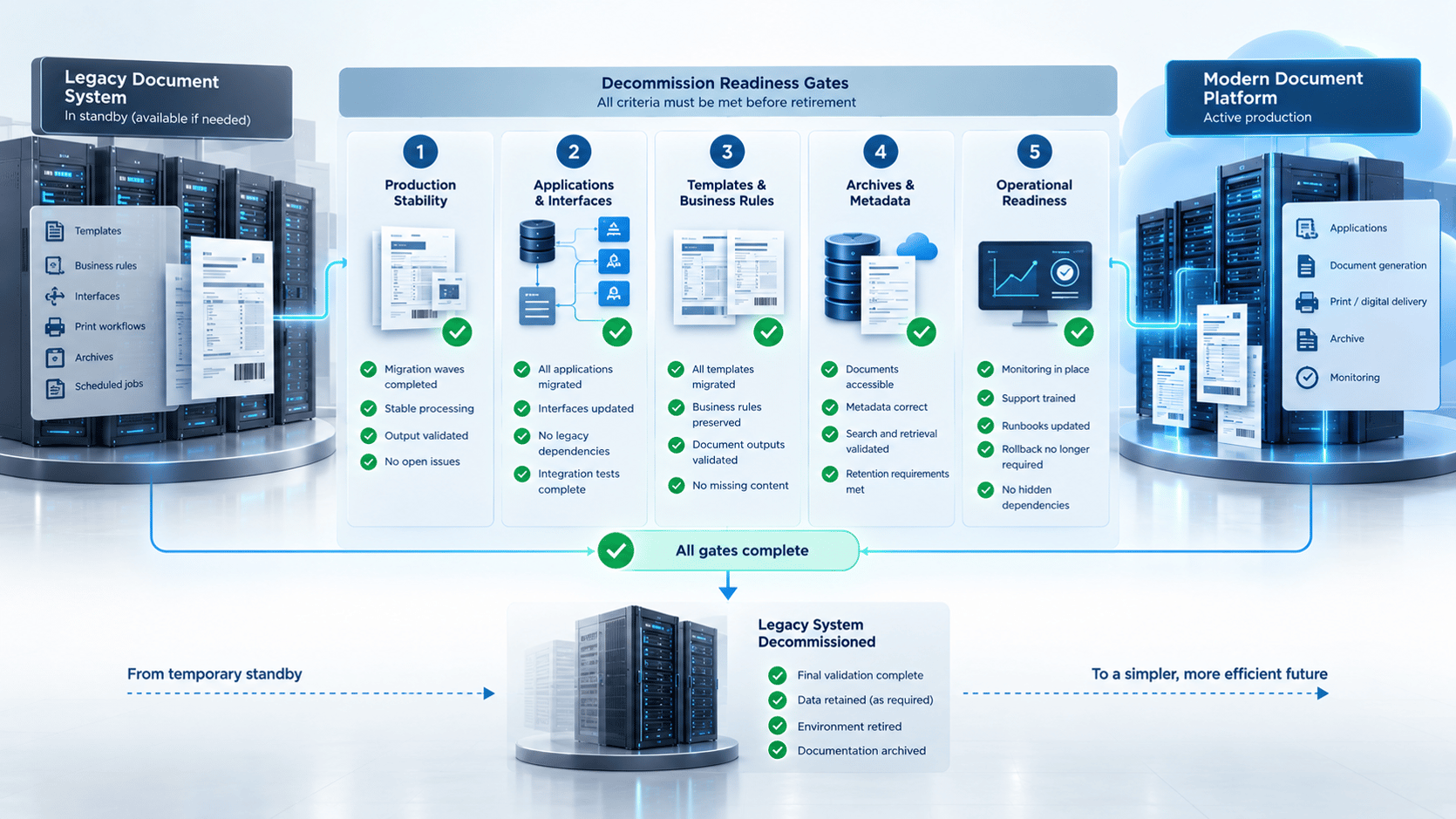
We treat decommissioning as a formal migration gate, not an administrative cleanup task. The legacy environment should remain available until approved workloads have moved, rollback requirements have been retired, archives are functioning, and monitoring shows no remaining production dependencies.
Before shutdown, we recommend confirming:
Production
- Migration waves are signed off.
- Critical document cycles have completed successfully.
- Exceptions and queues are stable.
- Parallel discrepancies are resolved.
Applications and interfaces
- No remaining legacy callers appear in logs.
- Scheduled and rarely used jobs have been checked.
- Manual and emergency paths are covered.
Documents and resources
- Required templates are approved.
- Legacy source projects are retained where needed.
- Business rules and resources are documented.
Archives and records
- Historical content remains retrievable.
- New output reaches the correct archive.
- Required metadata is present.
- Retention requirements have been reviewed.
Operations and security
- Target monitoring is operational.
- Runbooks are complete.
- Support ownership is established.
- Legacy accounts and infrastructure can be retired through normal security and asset processes.
We recommend letting the evidence determine the shutdown date rather than relying only on the project calendar.
Our professional services include consulting, intelligent form design, training, SaaS document generation, and technical support. (https://docpath.com/services/)
How Can DocPath Support a Continuity-First Legacy Migration?
For supported legacy environments, our objective is to modernize document production while minimizing unnecessary changes to the applications and operational processes around it. We combine migration capabilities with enterprise integration, document generation, physical and digital output, and technical services.
Our current migration portfolio includes:
- JetForm/Adobe Central, including supported scenarios that can process existing input data.
- InfoPrint Designer/AFP Utilities, including IBM i compatibility and outputs such as PDF, HTML5, PCL, and labels.
- Control-D, with a modernization path for report and output management.
Our integration architecture also includes IBM z/OS and IBM i connectivity alongside ERP, CRM, banking, and insurance systems.
Two of our customer cases illustrate the continuity principle. In our Fifth Third Bank case, we describe replacing a legacy JetForm executable while allowing existing applications to continue without modification.
In our BBVA case, we report that existing forms were automatically converted without requiring application changes and that the implementation supported AFP output.
For us, the key migration question is not simply, "Can we convert these templates?"
It is:
"Can we replace the document-generation platform while proving that the applications, data feeds, rules, outputs, printers, archives, and operating processes around it still behave as required?"
That is the standard we recommend using to plan the migration.
Planning a move from a legacy document-generation or CCM environment? Contact us to review your templates, interfaces, data streams, outputs, and continuity requirements.
Frequently Asked Questions
What is legacy document system migration?
We define legacy document system migration as the controlled replacement of software that composes, generates, prints, distributes, or archives business documents while preserving the templates, data, rules, interfaces, and downstream processes production depends on.
It differs from repository migration because the main object being modernized is a live document-production process, not only stored files.
Can a legacy document system be migrated without changing the calling applications?
Sometimes. If the target platform can preserve the legacy interface contract and consume the same input data or parameters, upstream applications may not need to change.
We document this approach for certain supported JetForm/Adobe Central migrations.
How do you test whether the new system produces the same documents?
We recommend testing equivalence across data, business rules, text, layout, pagination, resources, output format, printer behavior, archives, and accessibility where applicable.
We define acceptable differences before testing so the result is a measurable acceptance decision rather than a subjective visual review.
Should the old and new document systems run in parallel?
We often recommend parallel operation for business-critical workloads when it provides useful evidence that the target behaves correctly under representative production conditions.
A common model is to generate through both environments while only the approved production path distributes customer-facing output.
How do you migrate AFP or PCL document production?
We treat AFP and PCL as production interfaces rather than simple export formats. We validate the generated stream, fonts and resources, pagination, barcodes, trays, duplex behavior, finishing, queues, and representative physical printers.
IBM documents AFP processing as dependent on resources including fonts, overlays, page segments, form definitions, and page definitions.
Do historical archives need to move during the document-generation migration?
Not necessarily. We can often leave historical content in its current repository if retrieval, security, retention, and audit requirements continue to be satisfied.
If historical documents must also move, we recommend managing archive migration as a separate workstream with its own completeness, metadata, and retrieval tests.
Should accessibility be added during a legacy document migration?
Yes, when accessible output is required by the organization, its customers, contracts, markets, or applicable rules. We view template migration as a practical point to introduce accessible-document requirements because the target structure and rendering logic are already being reviewed.
ISO 14289-2:2024 defines requirements for accessible PDF 2.0 documents.